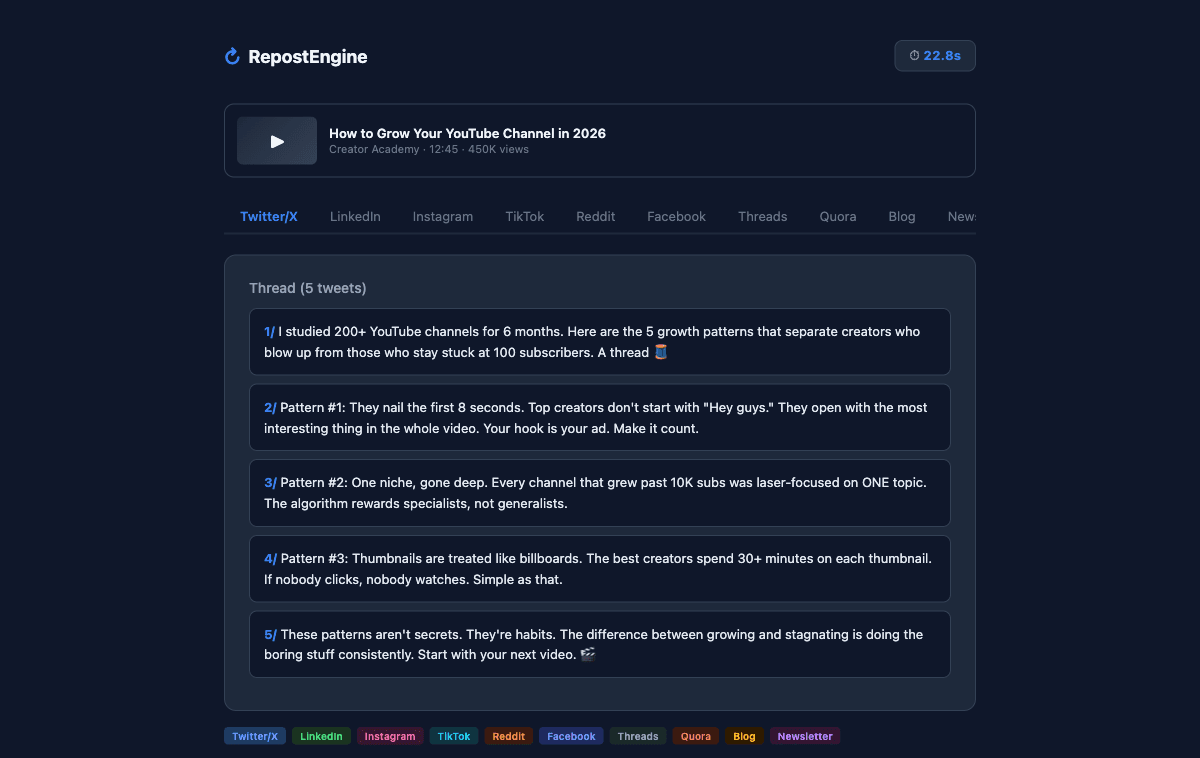
I Spent 4 Hours Repurposing One Video. Then I Built a Tool to Do It in 30 Seconds
A few months ago, I recorded a 12-minute YouTube video breaking down how I approach product launches. Nothing fancy, just me, a whiteboard, and a camera I probably should have cleaned first.
The video did fine. A few hundred views. Some good comments. But here's what killed me: the three hours I spent after hitting publish.
I opened a Google Doc and started writing a Twitter thread based on the video. Then I switched tabs to draft a LinkedIn post. Then Instagram needed a caption with hashtags. Then I thought, "I should probably put this on Reddit too." By the time I'd adapted that one video for six platforms, it was midnight and I hadn't eaten dinner.
The worst part? I still had four platforms left.
That night is why RepostEngine exists. But before I get to that, let me share what I learned about repurposing content the hard way, and the workflow I wish someone had handed me a year ago.
The Problem Nobody Talks About
Everyone says "repurpose your content." It's become gospel in the creator economy, and they're right. Almost half of marketers say repurposing is their most effective strategy for reach. The logic is bulletproof; you already did the hard work of creating something good. Why let it live on only one platform?
But here's what the advice givers leave out: repurposing is brutally tedious.
It's not creative work. It's reformatting work. Taking a 12-minute video and figuring out which 280-character chunks work as a Twitter thread. Stripping out the conversational tone for LinkedIn's professional vibe. Adding hashtags for Instagram. Writing a TL;DR for Reddit because nobody there will read your full post without one.
Each platform has its own language, its own culture, its own format expectations. And if you just copy-paste the same text everywhere (which I tried), engagement craters. People can smell lazy cross-posting from a mile away.
The Workflow I Eventually Figured Out
After months of doing this manually (and poorly), I mapped out a system that actually works. Here's the sequence:
Start with the transcript, not the video.
This was my first big realization. Watching your own video back to pull quotes is painfully slow. But if you grab the transcript — YouTube auto-generates one, even if it's messy, you've got raw text to work with. That's your source material. Everything flows from there.
Extract the core argument first.
Before you adapt for any platform, figure out the one thing your video is actually saying. Not the five things. The one thing. My product launch video? The core argument was: "Launch to your existing audience before you launch to strangers." That's it. Every platform adaptation is just a different angle on that single idea.
Work in order of difficulty.
I always start with X because it's the hardest constraint. You've got to compress everything into a thread of short punches. If you can make your argument work in a thread, the longer formats (LinkedIn, blog post, newsletter) almost write themselves. You're expanding instead of compressing, which is infinitely easier.
Then go platform by platform.
- X: Thread format. Hook in the first tweet. One idea per tweet. End with a takeaway.
- LinkedIn: Single post. Professional but not stiff. Open with a bold statement or counterintuitive take.
- Instagram: Caption under 2,200 characters. Front-load the hook because it gets cut off. Add hashtags at the end, around 15 to 20 relevant ones.
- Facebook: Conversational. Slightly longer than LinkedIn. Ask a question to drive comments.
- Threads: Similar to Twitter but you can breathe a bit more. Slightly longer segments.
- Reddit: Title that sparks curiosity. Body text that delivers value immediately. Always include a TL;DR. Pick the right subreddit or you're dead on arrival.
- Quora: Find a question that your video answers. Write the response as if you're helping one person, not broadcasting.
- Blog post: This is your SEO play. Expand the transcript into a full article with headings, internal links, and a meta description.
- Newsletter: Subject line that earns the open. Personal tone. Link back to the video or blog post.
- TikTok: Write a hook script for the first 3 seconds. That's where you win or lose. Caption is secondary.
Ten platforms. One video. Each version feels native because it is native. You're not copy-pasting, you're translating.
Where Most People Break Down
The workflow above works. I know because I used it manually for three months. But here's the honest truth: I stopped doing it consistently after week six.
Not because it didn't work. Because it took too long.
Even with the system, I was spending 90 minutes per video on repurposing. That's 90 minutes I wasn't spending on making the next video, or building my product, or, here's a radical thought, sleeping.
And I'm not alone in this. Two thirds of marketers now use AI tools to help with content adaptation. Not because they're lazy. Because the manual version doesn't scale.
This is the gap I kept staring at. The workflow was solid. The execution was unsustainable.
So I Built the Thing
I've spent 9+ years as a software engineer building web and mobile apps. RepostEngine is the first thing I built for myself.
It started as a script. Paste a YouTube URL, get a Twitter thread back. That was version one. Then I added LinkedIn. Then Instagram. Then I thought, "Why not all ten?"
The core idea is simple: the tool grabs your video transcript, understands the content, and generates platform specific versions. Each one with its own system prompt that controls tone, structure, and format. A Twitter thread that reads like a thread. A LinkedIn post that reads like a LinkedIn post. Not the same text pasted into different boxes.
What used to take me 90 minutes now takes about 30 seconds.
I'm not going to pretend the output is always publish ready. It's not. I still edit maybe 20% of what comes out. Tweaking a hook here, swapping a word there. But there's an enormous difference between editing a solid draft and staring at a blank page ten times over.
The Part That Actually Matters
Here's what changed when repurposing stopped being a chore: I actually did it.
Every video I publish now goes to ten platforms the same day. My reach tripled. Not because any individual post went viral, but because I'm showing up in ten places instead of two. Some of my best LinkedIn connections came from people who first saw me on Reddit. A newsletter subscriber told me they found me through a Quora answer.
That's the compounding effect of repurposing. It's not about any single platform. It's about the surface area.
And the irony is, the content barely changes. The same insight, shaped ten different ways. The work was always in the shaping, not the thinking.
Your Turn
Here's my challenge to you: take your next video, or your last one, and repurpose it for just three platforms. Not ten. Three. Pick the ones where your audience already hangs out.
Use the workflow I described above. Start with the transcript. Find the core argument. Adapt from there.
If you want to skip the manual part entirely, RepostEngine does this in about 30 seconds. Paste the URL, pick your platforms, edit what comes out. Free for 3 videos/month, no credit card.
But even if you do it by hand, the point is the same: your content deserves more than one stage.
You already made something worth watching. Now make it worth finding.

Mohanad Elhag
FounderBuilding RepostEngine, helping creators turn one YouTube video into content for 10 platforms in 30 seconds. Passionate about content repurposing, AI tools, and the creator economy.